How I sent 11,700 emails and got $133,788 in leads (+email copy)
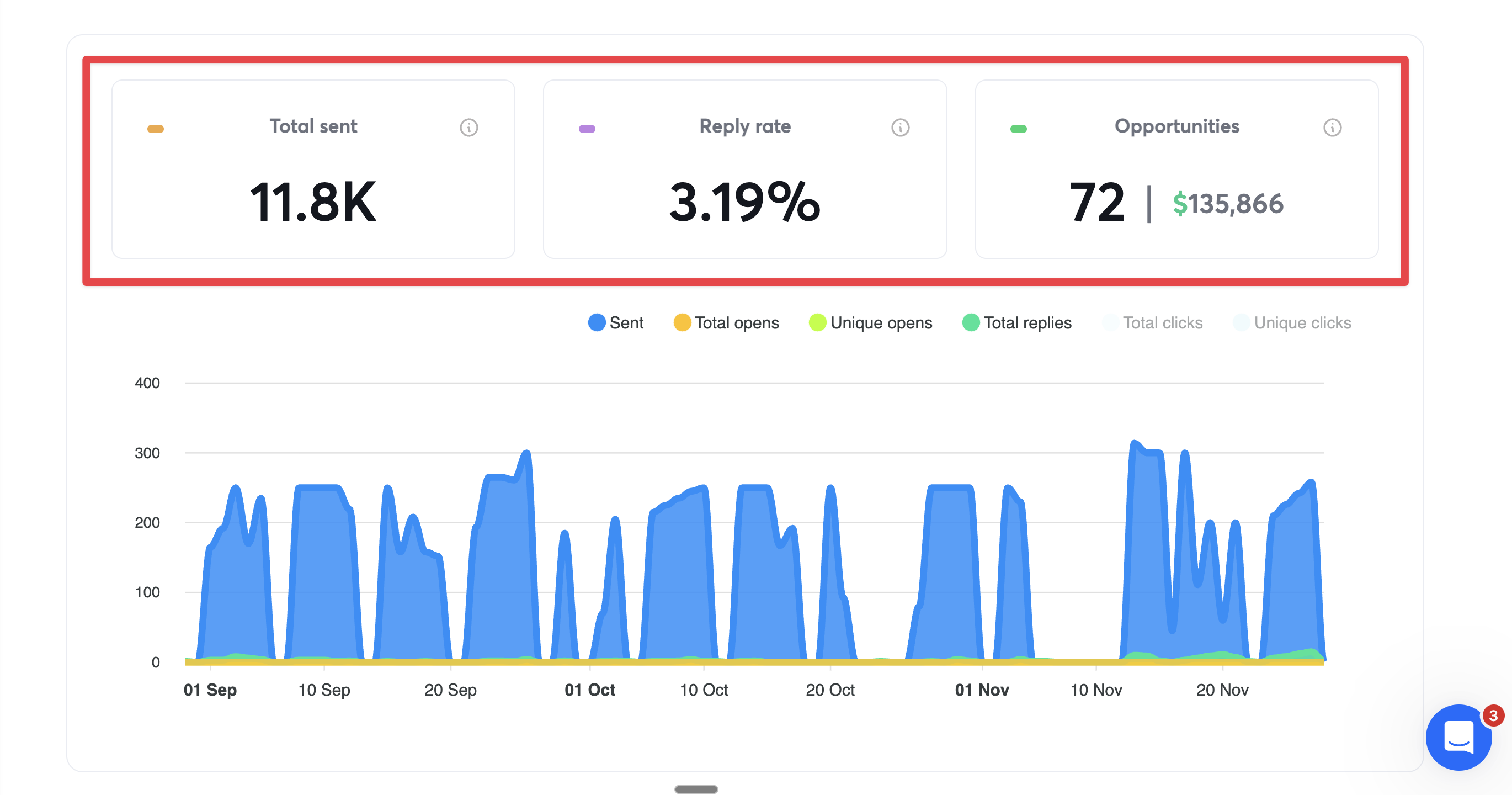
Table of Contents
- 1.The Results Overview
- 2.The 40/40/20 Framework
- 3.Part 1: The Email Copy That Works (5%)
- 4.Part 2: Building Your Hyper-Targeted List (15%)
- 5.Part 3: Speed to Reply - The 80% Game-Changer
- 6.Common Mistakes to Avoid
📊Results Overview
⚡The 40/40/20 Framework
After running dozens of campaigns, I discovered this breakdown:
Speed to Reply
- →How fast you respond to positive replies
- →Most people ignore this completely
- →It's the biggest lever you can pull
Hyper-Targeted List
- →Quality of your lead list
- →ICP accuracy matters more than list size
- →Better to email 1,200 perfect leads than 50,000 spray and prays
Copy
- →Yes, it matters, but not as much as you think
- →Most people obsess over this and ignore the 95%
- →Keep it simple, direct, and pain-focused
Part 1: The Email Copy That Works (5%)
The 3-Line Email Structure
For pay-per-lead agencies, I used this exact structure:
Subject: Quick question about [their pain point]
Body:
Line 1 (The Hook):
"If I can 2X your booked meetings, would that be of interest?"
Line 2 (Social Proof):
"One of our clients went from 11 to 35 meetings/month using [solution] to reply in < 15mins"
Line 3 (Low-Friction CTA):
"Can I set you up with it? Takes 5mins, no CC needed" / "Can I send you a video"
Signature:
Best,
[Your Name]
⚡ A low friction CTA is a MUST
Why This Works
Line 1 - Direct Pain Point:
- • For agencies, more meetings = more revenue
- • The hook speaks directly to their core metric
- • It's a question, not a pitch
- • Forces them to think about the outcome
Line 2 - Specific Social Proof:
- • Real numbers (11 → 35 meetings)
- • Specific timeframe (< 15mins)
- • Shows the mechanism (fast replies)
- • Similar company to them
Line 3 - Zero Friction:
- • "5mins" → shows it's easy
- • "no CC" → removes risk
- • "Can I" → asking permission, not pushing
The Template (Adapt for Your ICP)
Subject: Quick question about [their main metric]
Hey [name],
If I could [2X their most important outcome], would you be interested?
We helped [similar company] go from [X to Y result] by [how] in under [timeframe].
Want me to set you up? Takes [X mins], no credit card.
Best,
[You]
Key Variables to Customize:
- • [their main metric] → What they care about most (meetings, revenue, leads, etc.)
- • [similar company] → Company/title that matches their profile
- • [X to Y result] → Specific before/after numbers
- • [how] → The mechanism (replying faster, better targeting, etc.)
- • [timeframe] → How long it took (5 mins, 1 week, etc.)
What NOT to Do
- ❌ Long emails with multiple paragraphs
- ❌ Generic personalization ("I saw you're in [industry]")
- ❌ Multiple CTAs or questions
- ❌ Attachments or links in first email
- ❌ Talking about features instead of outcomes
- ❌ Using "innovative," "revolutionary," or other buzzwords
Part 2: Building Your Hyper-Targeted List (15%)
The Problem with Most Lead Lists
Most people:
- 1. Go to Apollo
- 2. Scrape 50,000 leads
- 3. Call it "lead gen"
- 4. Wonder why they get 0.5% reply rates
Reality: Those leads are burned. They've been emailed by 200 other people.
My 3-Day ICP Building Process
Day 1: Define Your Perfect Customer
For pay-per-lead agencies, I built this profile:
Generic Filters:
- • Company size: 10-50 employees
- • Industry: Pay-per-lead agencies
- • Revenue: $2M-$10M (estimated)
- • Location: US-based
Tech Stack:
- • Using Instantly, Smartlead, or similar
- • Using CRMs (HubSpot, Salesforce)
- • Running active campaigns
Intent Signals:
- • Job postings for "SDR" or "BDR"
- • Posting about cold email on LinkedIn
- • Running ads for lead gen services
- • 🔥 Pro Tip: Scraping posts is a gold mine, but depends on your niche. If your customers don't post a lot, this will be hard
Day 2: Find Non-Obvious Data Sources
Don't just use Apollo. Go where others don't:
1. LinkedIn Sales Navigator
- • Filter by company size + industry
- • Look for recent job postings
- • Check who's engaging with cold email content
2. BuiltWith / WhatRuns
- • Find companies using specific tools
- • Filter by email sending platforms
- • Export the list
3. Job Boards (Indeed, LinkedIn Jobs)
- • Search "[your ICP] + SDR/BDR"
- • Companies hiring = actively doing outbound
- • These are warm leads
4. Industry Communities
- • Reddit threads (r/EmailOutreach, r/Sales)
- • Slack communities
- • LinkedIn groups
- • Who's asking questions about your solution?
5. Your Competitors' Customers
- • G2 reviews
- • Case studies on their websites
- • LinkedIn followers/engagers
Day 3: Enrich & Validate
Use Apollo/Lusha for enrichment ONLY:
- • Get email addresses
- • Add phone numbers
- • Company details
Validate emails:
- • Use NeverBounce or ZeroBounce
- • Remove catch-alls and role emails
- • Keep deliverability above 95%
Final list size: 1,200 leads
Not 50,000. Not 10,000. Just 1,200 PERFECT leads.
Lead Scoring System
Not all leads in your ICP are equal. I scored each lead:
High Priority (Email First):
- • Recent job posting for SDR/BDR (+3 points)
- • Using target tools (+3 points)
- • Engaged with cold email content recently (+2 points)
- • Company 20-50 employees (+2 points)
Score: 8-10 points
Medium Priority:
- • Using some target tools (+2 points)
- • Right company size (+1 point)
- • In target industry (+2 points)
Score: 5-7 points
Low Priority:
- • In target industry only (+1 point)
Score: 1-4 points
Email high-priority leads first. Your reply rate will be higher.
Part 3: Speed to Reply - The 80% Game-Changer 🔥
The Data That Changed Everything
I tracked every positive reply for 2 months:
| Reply Time | Book Rate | Volume |
|---|---|---|
< 5 minutes | 65% | 23 meetings |
2-4 hours | < 30% | 6 meetings |
4+ hours | 2% | 4 meetings |
I was checking my inbox twice a day (morning and afternoon).
Average reply time: 4-6 hours.
I was leaving 60-70% of my pipeline on the table.
Why Speed Matters
Context-switching kills conversions:
When someone replies positively to your cold email, they have YOU in context:
- • They just read your email
- • They're thinking about their problem
- • They're mentally ready to book a call
Wait 4 hours?
- • They've moved on
- • They forgot about you
- • They're in 10 other conversations
- • The moment is gone
The magic window: First 5 minutes.
How to Set This Up
Tip: Use ColdStack to view + send replies from Slack
Get instant notifications in Slack when you receive positive replies. Reply directly from Slack without logging into multiple platforms. The fastest way to ensure sub-5-minute response times.
Option 1: Zapier Automation
Tools needed:
- • Zapier
- • Instantly/Smartlead
- • Slack
- • OpenAI API (for AI drafts)
Zap structure:
- 1. Trigger: New reply in Instantly
- 2. Filter: Only positive replies (use AI sentiment analysis)
- 3. Enrich: Get company data (Clearbit/Apollo)
- 4. AI Draft: Generate reply (OpenAI)
- 5. Slack: Send notification with draft
- 6. Manual: Reply from unified inbox
Setup time: 2-3 hours
Cost: $20/mo Zapier + $20/mo OpenAI
Downside: Still need to log into unified inbox to reply.
Option 2: Basic Slack Notifications
Simplest version:
- 1. Set up email forwarding from your cold email tool
- 2. Forward positive replies to a Slack email
- 3. Get notified
- 4. Reply from unified inbox
Setup time: 30 minutes
Cost: Free
Downside: No AI drafts, no auto "reply as"
Common Mistakes to Avoid
Mistake #1: Obsessing Over Copy
The Problem: Spending weeks testing subject lines while ignoring reply speed.
The Fix: Get copy to "good enough" (use my template), then focus on speed.
⚠️ Mistake #2: Buying Giant Lead Lists
The Problem: 50,000 burned leads from Apollo won't perform no matter how good your copy is.
The Fix: Build a small, hyper-targeted list of 1,000-2,000 perfect leads.
🚨 Mistake #3: Checking Inbox Twice a Day
The Problem: 4+ hour reply time = 12% book rate.
The Fix: Set up instant notifications. Reply within 5 minutes.
Mistake #4: Not Tracking Reply Time
The Problem: Can't improve what you don't measure.
The Fix: Track your reply time for every positive response. Monitor weekly.
Mistake #5: Ignoring Deliverability
The Problem: If emails aren't landing in inbox, nothing else matters.
The Fix:
- • Keep sending volume under 30/day per email account
- • Use 3-5 email accounts
- • Warm up domains for 2-3 weeks
- • Monitor spam rates (<1%)
Speed to reply is 80% of the game
Most people ignore this and wonder why their campaigns don't work. Here's how ColdStack helps you fix it.
Reply in Under 5 Minutes
Get instant Slack notifications when positive replies come in. Reply directly from Slack without switching tools or checking multiple inboxes.
Unified Inbox for All Senders
Manage replies from Instantly, Smartlead, and EmailBison in one place. No more logging into 3+ different platforms to check replies.
Start your 14-day free trial. No credit card required.
Join sales teams using ColdStack to reply 10x faster